Automate Drive-To-Store Lead Generation System (with coupon) on SuiteCRM
工作流概述
这是一个包含16个节点的复杂工作流,主要用于自动化处理各种任务。
工作流源代码
{
"meta": {
"instanceId": "a4bfc93e975ca233ac45ed7c9227d84cf5a2329310525917adaf3312e10d5462"
},
"name": "Automate Drive-To-Store Lead Generation System (with coupon) on SuiteCRM",
"tags": [],
"nodes": [
{
"id": "53342c2a-f707-4ed0-9054-7928e6832745",
"name": "Token SuiteCRM",
"type": "n8n-nodes-base.httpRequest",
"position": [
1560,
920
],
"parameters": {
"url": "=https://SUITECRMURL/Api/access_token",
"options": {},
"requestMethod": "POST",
"bodyParametersUi": {
"parameter": [
{
"name": "grant_type",
"value": "client_credentials"
},
{
"name": "client_id",
"value": "CLIENTID"
},
{
"name": "client_secret",
"value": "CLIENTSECRET"
}
]
},
"allowUnauthorizedCerts": true
},
"notesInFlow": true,
"typeVersion": 1
},
{
"id": "18d04094-1ced-4431-9ba2-b9b33d76c453",
"name": "Create Lead SuiteCRM",
"type": "n8n-nodes-base.httpRequest",
"position": [
1800,
920
],
"parameters": {
"url": "https://SUITECRMURL/Api/V8/module",
"method": "POST",
"options": {
"response": {
"response": {
"responseFormat": "json"
}
}
},
"jsonBody": "={\"data\":
{
\"type\": \"Leads\",
\"attributes\": {
\"first_name\": \"{{ $('Form Fields').item.json.Name }}\",
\"last_name\": \"{{ $('Form Fields').item.json.Surname }}\",
\"email1\": \"{{ $('Form Fields').item.json.Email }}\",
\"phone_mobile\":\"{{ $('Form Fields').item.json.Phone }}\",
\"coupon_c\": \"{{ $('Get Coupon').item.json.COUPON }}\"
}
}
}",
"sendBody": true,
"sendHeaders": true,
"specifyBody": "json",
"headerParameters": {
"parameters": [
{
"name": "Authorization",
"value": "=Bearer {{$node[\"Token SuiteCRM\"].json[\"access_token\"]}}"
},
{
"name": "Content-Type",
"value": "application/vnd.api+json"
}
]
}
},
"notesInFlow": true,
"typeVersion": 3
},
{
"id": "59b9c124-f6eb-457d-b3cb-2c831b66db85",
"name": "Webhook",
"type": "n8n-nodes-base.webhook",
"position": [
440,
1020
],
"webhookId": "4b98315d-782e-47a5-8fea-7d16155c811d",
"parameters": {
"path": "4b98315d-782e-47a5-8fea-7d16155c811d",
"options": {},
"httpMethod": "POST"
},
"typeVersion": 2
},
{
"id": "75d6f561-754d-4153-8a85-12cb135a555c",
"name": "On form submission",
"type": "n8n-nodes-base.formTrigger",
"position": [
440,
820
],
"webhookId": "63d1d84b-c41e-4d3d-961a-0aa2af830ceb",
"parameters": {
"options": {},
"formTitle": "Landing",
"formFields": {
"values": [
{
"fieldLabel": "Name",
"placeholder": "Name",
"requiredField": true
},
{
"fieldLabel": "Surname",
"placeholder": "Surname",
"requiredField": true
},
{
"fieldType": "email",
"fieldLabel": "Email",
"placeholder": "Email",
"requiredField": true
},
{
"fieldLabel": "Phone",
"placeholder": "Phone",
"requiredField": true
}
]
}
},
"typeVersion": 2.2
},
{
"id": "e9eac3a2-0351-4457-ae1d-44d42974ab20",
"name": "Duplicate Lead?",
"type": "n8n-nodes-base.googleSheets",
"position": [
880,
820
],
"parameters": {
"options": {},
"filtersUI": {
"values": [
{
"lookupValue": "={{ $json.Email }}",
"lookupColumn": "EMAIL"
}
]
},
"sheetName": {
"__rl": true,
"mode": "list",
"value": "gid=0",
"cachedResultUrl": "https://docs.google.com/spreadsheets/d/1lnRZodxZSOA0QSuzkAb7ZJcfFfNXpX7NcxMdckMTN90/edit#gid=0",
"cachedResultName": "Foglio1"
},
"documentId": {
"__rl": true,
"mode": "list",
"value": "1lnRZodxZSOA0QSuzkAb7ZJcfFfNXpX7NcxMdckMTN90",
"cachedResultUrl": "https://docs.google.com/spreadsheets/d/1lnRZodxZSOA0QSuzkAb7ZJcfFfNXpX7NcxMdckMTN90/edit?usp=drivesdk",
"cachedResultName": "Coupon"
}
},
"credentials": {
"googleSheetsOAuth2Api": {
"id": "JYR6a64Qecd6t8Hb",
"name": "Google Sheets account"
}
},
"typeVersion": 4.5,
"alwaysOutputData": true
},
{
"id": "a5ae5f5a-7028-495b-ad27-192561ce88d5",
"name": "Form Fields",
"type": "n8n-nodes-base.set",
"position": [
680,
820
],
"parameters": {
"options": {},
"assignments": {
"assignments": [
{
"id": "661d1475-f964-4a12-bfe7-88bf96851319",
"name": "Name",
"type": "string",
"value": "={{ $json.Name }}"
},
{
"id": "9991645d-c716-47db-80d6-850f3d64c782",
"name": "Surname",
"type": "string",
"value": "={{ $json.Surname }}"
},
{
"id": "c999afa6-2ec7-4f7f-bf3b-088a3597591c",
"name": "Email",
"type": "string",
"value": "={{ $json.Email }}"
},
{
"id": "f3faccdb-2412-4363-a0e3-f13b8f85b242",
"name": "Phone",
"type": "string",
"value": "={{ $json.Phone }}"
}
]
}
},
"typeVersion": 3.4
},
{
"id": "9edb0d07-b4fb-42f8-9555-1d3caf8998c7",
"name": "Get Coupon",
"type": "n8n-nodes-base.googleSheets",
"position": [
1340,
920
],
"parameters": {
"options": {
"returnFirstMatch": true
},
"filtersUI": {
"values": [
{
"lookupColumn": "ID LEAD"
}
]
},
"sheetName": {
"__rl": true,
"mode": "list",
"value": "gid=0",
"cachedResultUrl": "https://docs.google.com/spreadsheets/d/1lnRZodxZSOA0QSuzkAb7ZJcfFfNXpX7NcxMdckMTN90/edit#gid=0",
"cachedResultName": "Foglio1"
},
"documentId": {
"__rl": true,
"mode": "list",
"value": "1lnRZodxZSOA0QSuzkAb7ZJcfFfNXpX7NcxMdckMTN90",
"cachedResultUrl": "https://docs.google.com/spreadsheets/d/1lnRZodxZSOA0QSuzkAb7ZJcfFfNXpX7NcxMdckMTN90/edit?usp=drivesdk",
"cachedResultName": "Coupon"
}
},
"credentials": {
"googleSheetsOAuth2Api": {
"id": "JYR6a64Qecd6t8Hb",
"name": "Google Sheets account"
}
},
"executeOnce": false,
"typeVersion": 4.5
},
{
"id": "9469dd95-04ac-4c74-abb3-674fec277f6e",
"name": "Respond OK",
"type": "n8n-nodes-base.respondToWebhook",
"position": [
2300,
920
],
"parameters": {
"options": {
"responseCode": 200
},
"respondWith": "json",
"responseBody": "{
\"result\": \"OK\",
\"reason\": \"lead created\"
}"
},
"typeVersion": 1.1
},
{
"id": "5b81c406-d70b-4a36-b4f4-8941373958b9",
"name": "Respond KO",
"type": "n8n-nodes-base.respondToWebhook",
"position": [
1320,
700
],
"parameters": {
"options": {
"responseCode": 200
},
"respondWith": "json",
"responseBody": "{
\"result\": \"KO\",
\"reason\": \"duplicate lead\"
}"
},
"typeVersion": 1.1
},
{
"id": "5fdf0eca-d1f6-4c9e-8e77-84d8e71bdb0e",
"name": "Is Duplicate?",
"type": "n8n-nodes-base.if",
"position": [
1080,
820
],
"parameters": {
"options": {},
"conditions": {
"options": {
"version": 2,
"leftValue": "",
"caseSensitive": true,
"typeValidation": "strict"
},
"combinator": "and",
"conditions": [
{
"id": "9e3a8422-14f1-453e-bfed-4feecff34662",
"operator": {
"type": "string",
"operation": "notEmpty",
"singleValue": true
},
"leftValue": "={{ $json.EMAIL }}",
"rightValue": "={{ $('Form Fields').item.json.email }}"
}
]
}
},
"typeVersion": 2.2
},
{
"id": "e9cba682-bf5b-4efa-9d10-4fab5d02610a",
"name": "Sticky Note",
"type": "n8n-nodes-base.stickyNote",
"position": [
420,
20
],
"parameters": {
"color": 3,
"width": 540,
"height": 380,
"content": "## STEP 1
Create a Google Sheet like this (Fill only the column \"COUPON\")
[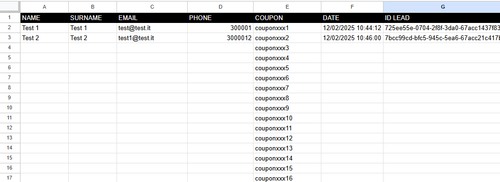]
This is the basic Google Sheet used in [this Workflow](https://docs.google.com/spreadsheets/d/1lnRZodxZSOA0QSuzkAb7ZJcfFfNXpX7NcxMdckMTN90/edit?usp=drive_link):
"
},
"typeVersion": 1
},
{
"id": "1c304620-368d-42bf-b0d2-de3f9d552e51",
"name": "Sticky Note1",
"type": "n8n-nodes-base.stickyNote",
"position": [
420,
440
],
"parameters": {
"color": 4,
"width": 540,
"height": 260,
"content": "## STEP 2 - MAIN FLOW
This workflow is ideal for businesses looking to automate lead generation and management, especially when integrating with CRM systems like SuiteCRM and using Google Sheets for data tracking.
If you use an external form, hook the webbook trigger and the two webhooks \"Respond KO\" and \"Respond OK\" to the workflow.
It works with SuiteCRM 7.14.x and 8.x version. Remeber to create a Lead custom fields called 'coupon' on SuiteCRM."
},
"typeVersion": 1
},
{
"id": "6248c920-02f4-4407-881a-376d2a9dd904",
"name": "Sticky Note2",
"type": "n8n-nodes-base.stickyNote",
"position": [
660,
740
],
"parameters": {
"width": 340,
"height": 240,
"content": "Check if the lead has already received the coupon"
},
"typeVersion": 1
},
{
"id": "0c07d1b7-b12f-4cf7-8d0c-1dd905365534",
"name": "Sticky Note3",
"type": "n8n-nodes-base.stickyNote",
"position": [
1300,
860
],
"parameters": {
"width": 180,
"height": 220,
"content": "Find the first available unassigned coupon"
},
"typeVersion": 1
},
{
"id": "34167626-9041-4cce-baaf-e1ed2efe8378",
"name": "Sticky Note4",
"type": "n8n-nodes-base.stickyNote",
"position": [
1540,
700
],
"parameters": {
"width": 400,
"height": 380,
"content": "Enter the lead with the relative coupon on Suite CRM. Change SUITECRMURL, CLIENTSECRET and CLIENTID
To create the CLIENTSECRET and CLIEDID go to Admin -> Oauth2 Client and Token -> and click on \"New CLient Credentials Client\"
For the full tutorial step-by-step [here the official SuiteCRM Docs](https://docs.suitecrm.com/developer/api/developer-setup-guide/json-api/#_generate_private_and_public_key_for_oauth2)"
},
"typeVersion": 1
},
{
"id": "50f65f6b-8045-4cb1-9e3d-489f27cdb038",
"name": "Update Lead",
"type": "n8n-nodes-base.googleSheets",
"position": [
2040,
920
],
"parameters": {
"columns": {
"value": {
"DATE": "={{ $now.format('dd/LL/yyyy HH:mm:ss') }}",
"NAME": "={{ $json.data.attributes.first_name }}",
"EMAIL": "={{ $json.data.attributes.email1 }}",
"PHONE": "={{ $json.data.attributes.phone_mobile }}",
"COUPON": "={{ $('Get Coupon').item.json.COUPON }}",
"ID LEAD": "={{ $json.data.id }}",
"SURNAME": "={{ $json.data.attributes.last_name }}"
},
"schema": [
{
"id": "NAME",
"type": "string",
"display": true,
"required": false,
"displayName": "NAME",
"defaultMatch": false,
"canBeUsedToMatch": true
},
{
"id": "SURNAME",
"type": "string",
"display": true,
"required": false,
"displayName": "SURNAME",
"defaultMatch": false,
"canBeUsedToMatch": true
},
{
"id": "EMAIL",
"type": "string",
"display": true,
"required": false,
"displayName": "EMAIL",
"defaultMatch": false,
"canBeUsedToMatch": true
},
{
"id": "PHONE",
"type": "string",
"display": true,
"required": false,
"displayName": "PHONE",
"defaultMatch": false,
"canBeUsedToMatch": true
},
{
"id": "COUPON",
"type": "string",
"display": true,
"removed": false,
"required": false,
"displayName": "COUPON",
"defaultMatch": false,
"canBeUsedToMatch": true
},
{
"id": "DATE",
"type": "string",
"display": true,
"required": false,
"displayName": "DATE",
"defaultMatch": false,
"canBeUsedToMatch": true
},
{
"id": "ID LEAD",
"type": "string",
"display": true,
"required": false,
"displayName": "ID LEAD",
"defaultMatch": false,
"canBeUsedToMatch": true
},
{
"id": "row_number",
"type": "string",
"display": true,
"removed": true,
"readOnly": true,
"required": false,
"displayName": "row_number",
"defaultMatch": false,
"canBeUsedToMatch": true
}
],
"mappingMode": "defineBelow",
"matchingColumns": [
"COUPON"
],
"attemptToConvertTypes": false,
"convertFieldsToString": false
},
"options": {},
"operation": "update",
"sheetName": {
"__rl": true,
"mode": "list",
"value": "gid=0",
"cachedResultUrl": "https://docs.google.com/spreadsheets/d/1lnRZodxZSOA0QSuzkAb7ZJcfFfNXpX7NcxMdckMTN90/edit#gid=0",
"cachedResultName": "Foglio1"
},
"documentId": {
"__rl": true,
"mode": "list",
"value": "1lnRZodxZSOA0QSuzkAb7ZJcfFfNXpX7NcxMdckMTN90",
"cachedResultUrl": "https://docs.google.com/spreadsheets/d/1lnRZodxZSOA0QSuzkAb7ZJcfFfNXpX7NcxMdckMTN90/edit?usp=drivesdk",
"cachedResultName": "Coupon"
}
},
"credentials": {
"googleSheetsOAuth2Api": {
"id": "JYR6a64Qecd6t8Hb",
"name": "Google Sheets account"
}
},
"typeVersion": 4.5
}
],
"active": false,
"pinData": {},
"settings": {
"executionOrder": "v1"
},
"versionId": "",
"connections": {
"Get Coupon": {
"main": [
[
{
"node": "Token SuiteCRM",
"type": "main",
"index": 0
}
]
]
},
"Form Fields": {
"main": [
[
{
"node": "Duplicate Lead?",
"type": "main",
"index": 0
}
]
]
},
"Is Duplicate?": {
"main": [
[],
[
{
"node": "Get Coupon",
"type": "main",
"index": 0
}
]
]
},
"Token SuiteCRM": {
"main": [
[
{
"node": "Create Lead SuiteCRM",
"type": "main",
"index": 0
}
]
]
},
"Duplicate Lead?": {
"main": [
[
{
"node": "Is Duplicate?",
"type": "main",
"index": 0
}
]
]
},
"On form submission": {
"main": [
[
{
"node": "Form Fields",
"type": "main",
"index": 0
}
]
]
},
"Create Lead SuiteCRM": {
"main": [
[
{
"node": "Update Lead",
"type": "main",
"index": 0
}
]
]
}
}
}功能特点
- 自动检测新邮件
- AI智能内容分析
- 自定义分类规则
- 批量处理能力
- 详细的处理日志
技术分析
节点类型及作用
- Httprequest
- Webhook
- Formtrigger
- Googlesheets
- Set
复杂度评估
配置难度:
维护难度:
扩展性:
实施指南
前置条件
- 有效的Gmail账户
- n8n平台访问权限
- Google API凭证
- AI分类服务订阅
配置步骤
- 在n8n中导入工作流JSON文件
- 配置Gmail节点的认证信息
- 设置AI分类器的API密钥
- 自定义分类规则和标签映射
- 测试工作流执行
- 配置定时触发器(可选)
关键参数
| 参数名称 | 默认值 | 说明 |
|---|---|---|
| maxEmails | 50 | 单次处理的最大邮件数量 |
| confidenceThreshold | 0.8 | 分类置信度阈值 |
| autoLabel | true | 是否自动添加标签 |
最佳实践
优化建议
- 定期更新AI分类模型以提高准确性
- 根据邮件量调整处理批次大小
- 设置合理的分类置信度阈值
- 定期清理过期的分类规则
安全注意事项
- 妥善保管API密钥和认证信息
- 限制工作流的访问权限
- 定期审查处理日志
- 启用双因素认证保护Gmail账户
性能优化
- 使用增量处理减少重复工作
- 缓存频繁访问的数据
- 并行处理多个邮件分类任务
- 监控系统资源使用情况
故障排除
常见问题
邮件未被正确分类
检查AI分类器的置信度阈值设置,适当降低阈值或更新训练数据。
Gmail认证失败
确认Google API凭证有效且具有正确的权限范围,重新进行OAuth授权。
调试技巧
- 启用详细日志记录查看每个步骤的执行情况
- 使用测试邮件验证分类逻辑
- 检查网络连接和API服务状态
- 逐步执行工作流定位问题节点
错误处理
工作流包含以下错误处理机制:
- 网络超时自动重试(最多3次)
- API错误记录和告警
- 处理失败邮件的隔离机制
- 异常情况下的回滚操作